


COMPTIA EXAM PREP 2026
4.694.00 Reviews
App Specs
- Version
- 2.1.019
- Updated On
- License
- Free
- Downloads
- 50,000+
- Developer
- Prepia Inc
- Categories
- Education
- Platform
- Android
Screenshots
 Analysis by AppCompare
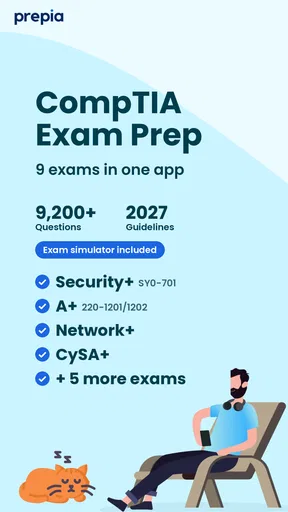
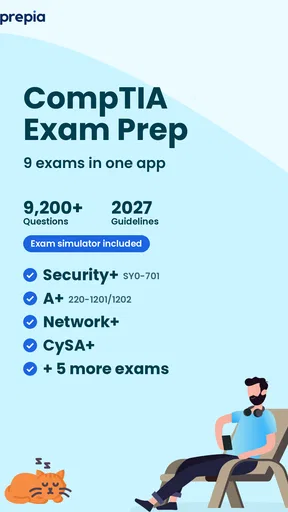
I would not choose a certification-prep app just because it promises a large question bank. The useful question is whether it helps me turn scattered study time into deliberate practice, and whether its material suits the particular CompTIA exam I am taking. COMPTIA EXAM PREP 2026 is an education app from Prepia Inc built around exam practice for certifications including A+, Security+, Network+, CySA+ and Linux+. That focus makes it worth considering if you want a phone-based way to review several parts of the CompTIA track, rather than a general IT learning course.
It is free to install, rated for Everyone, and has an average rating of 4.5 from around 550 ratings. The app has over 10,000 installs, which gives a prospective user some reassurance that it is being used, though popularity alone cannot tell you whether its questions match your needs. Its current version is 2.0.24, and the listed minimum operating-system requirement is 7.0. I would treat those details as practical checks before downloading, especially if you are using an older device.
Choose it for practice, not as your whole study plan
The strongest reason to try this app is convenience: practice questions can fit into small gaps that are otherwise easy to waste. A short session on a commute, between classes, or after work can help you revisit terminology and notice which topics still feel shaky. That is a different job from learning a difficult concept from scratch, so I would pair question practice with a reliable course, book, or hands-on lab when a subject needs a fuller explanation.
That distinction matters across the certifications it covers. A learner preparing for A+ may be reviewing a broad base of support and hardware concepts, while a Security+ candidate may need to connect security terms to scenarios. Network+ and Linux+ call for their own kinds of technical understanding, and CySA+ has a different emphasis again. One app can be convenient across that range, but I would still select material with the exact exam in mind rather than assume that all CompTIA study is interchangeable.
Make each practice session useful
A practical way to use an exam-prep app is to answer questions in two passes. First, work at a steady pace without stopping to look up every unfamiliar term. Then review the items you missed or guessed, and write down the reason: a knowledge gap, a misread question, or two answer choices that seemed too similar. This small habit makes a score more informative. It also stops a string of correct guesses from creating false confidence.
For example, if I had a busy weekday and only a few spare minutes, I would use a short session to revisit one exam area rather than attempt a long, unfocused review. I would note recurring mistakes and reserve a longer block later to study the underlying concepts elsewhere. The app can support that routine, but the value comes from how you respond to the results—not from tapping through questions as quickly as possible.
Check the purchase model before settling in
The app is free, but it also offers in-app purchases priced from about five to sixty dollars per item. I would install it and inspect the available study options before making a purchase, then decide whether the content on offer fits the exam I am taking and the way I like to study. A paid item is only worthwhile if it fills a specific gap in your preparation; the existence of a purchase option is not, by itself, a reason to upgrade.
Worth Reading Before You Choose

Flipboard Shows What News Apps Must Do Beyond the Feed

Switching to Android Auto Means Rethinking Your Driving Routine

Google Calendar Makes a Crowded Week Easier to Manage

Ludo King Makes the Most of the Minutes Between Plans

Baby Panda World Brings Quick Play to Modern Phones, but Its Game Library Feels Busy

ESPN’s Live Game View Makes Following Close Games Easier
There is also a useful trade-off in choosing a phone app. It is easy to open for quick review, but a small screen is less comfortable for comparing long explanations or keeping notes beside a question. If your main study method involves detailed reading, diagrams, or a lab environment, a larger device or a dedicated course may be a better center for your preparation. I see mobile practice as a supplement that makes the time between those sessions more productive.
Who is likely to get the most from it?
I would recommend giving it a try if you already know which CompTIA certification you are pursuing and want a convenient way to test recall regularly. It may also suit someone who has completed a course and now needs a routine for spotting weak areas. On the other hand, if you are still deciding which certification fits your goals, or you need step-by-step teaching before you can answer practice questions, start with a learning resource that explains the field and exam objectives first.
When comparing it with common alternatives, think in terms of the job each one does. A textbook or structured video course is usually easier to follow for a first pass through unfamiliar material; labs are more suitable for building practical confidence; and a question-focused app is handy for retrieval practice and quick self-checks. I would not expect one format to replace the others. The best choice depends on whether your current bottleneck is understanding, hands-on application, or remembering and applying what you have already studied.
If you are unsure whether this app’s approach fits you, begin with a small trial routine rather than reorganizing your entire study plan around it. Try a few focused sessions, check whether the available questions map to your chosen certification, and notice whether reviewing mistakes leads to clearer understanding. If it feels like repetitive tapping without useful explanations or direction, keep it as a minor revision tool—or choose a different resource that better matches the way you learn.
First Impressions: User-Friendly Interface
When you first open the COMPTIA Exam Prep 2026 app, you're greeted with a sleek and intuitive interface. It's like the app designers knew exactly what we needed – simplicity and efficiency. The dashboard is clean, and everything is where you'd expect it to be. No fuss, no muss.
The app is tailored to help you navigate through the complexities of the COMPTIA certification process with ease. All the features are neatly categorized, making it a breeze to find the exact study material you need. Whether you’re a beginner or a seasoned IT professional, you’ll find it easy to get started.
Comprehensive Study Material
One of the standout features of this app is the depth and breadth of its study material. The developers have packed it with resources that cover every nook and cranny of the COMPTIA syllabus. From detailed study guides to practice questions, it’s all here. You can practically feel yourself becoming smarter with each tap!
What I love about this is that it’s not just about quantity but also quality. The content is updated regularly to ensure it aligns with the latest exam patterns, which is crucial for staying ahead of the curve. Plus, the app provides a variety of learning methods, catering to different learning styles. Whether you prefer reading text, watching videos, or taking quizzes, COMPTIA Exam Prep 2026 has got you covered.
Practice Makes Perfect
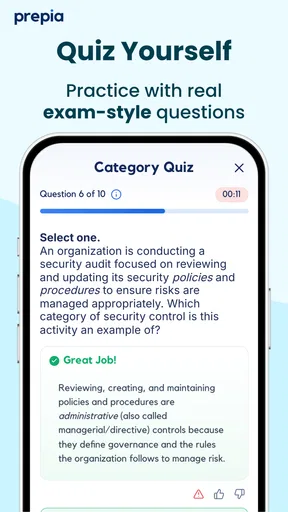
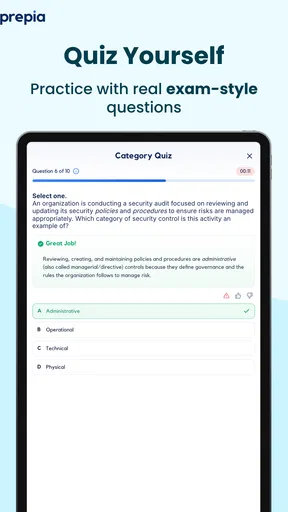
We’ve all heard the saying, “Practice makes perfect,” and this app takes it to heart. The practice tests are robust and mimic the actual exam environment, which is fantastic for reducing those pre-exam jitters. You can take full-length practice exams or focus on specific areas where you need improvement. The flexibility here is a game-changer.
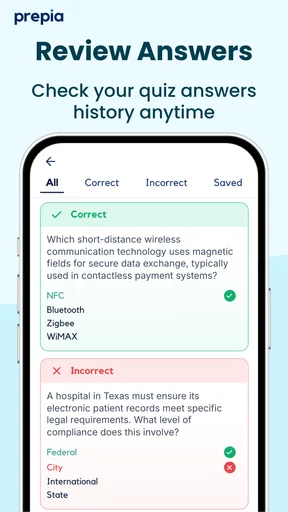
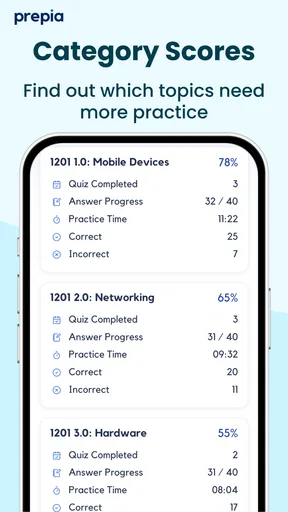
And let's talk about feedback. After each practice test, you get a detailed analysis of your performance. This feature is pure gold because it helps you identify your strengths and weaknesses. It’s like having a personal tutor guiding you every step of the way.
Progress Tracking
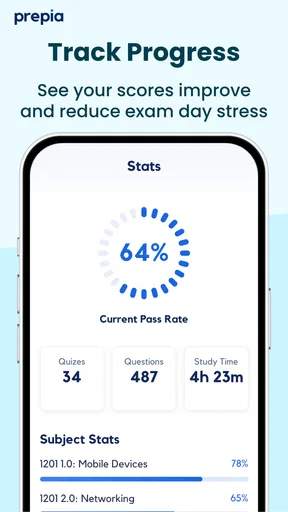
Staying motivated during exam prep can be tough, but the app’s progress tracking feature keeps you engaged. You can set goals, track your progress, and even get little motivational boosts along the way. The app celebrates your milestones, no matter how small, which is a great way to keep your spirits high.
Seeing your progress visually represented can be incredibly motivating. It’s satisfying to watch your scores climb and your confidence grow. Plus, this feature helps you manage your study schedule effectively, ensuring you’re exam-ready by the time the big day rolls around.
Community Support
Another cool aspect of the COMPTIA Exam Prep 2026 app is the community feature. You can connect with other users, share tips, and even vent about your exam woes. It’s like having a study group in your pocket. The sense of camaraderie is comforting and can be just the push you need when the going gets tough.
This feature makes the app not just a study tool but a support system. You’re not alone on this journey, and having a community to lean on can make all the difference.
Wrapping It Up
Overall, the COMPTIA Exam Prep 2026 app is a powerhouse of resources and a delightful companion for anyone preparing for their COMPTIA certification. It’s user-friendly, packed with comprehensive study materials, and offers excellent practice opportunities. Plus, the added bonus of community support makes it feel like you’re part of something bigger than just your study journey.
Whether you’re just starting out on your certification path or looking to sharpen your skills, this app is worth checking out. With its thoughtful design and robust features, it just might be the edge you need to ace that exam. Happy studying, and may your scores be ever in your favor!
Pros
- Comprehensive practice questions.
- User-friendly interface design.
- Real-time progress tracking.
- Offline access available.
- Customizable study plans.
Cons
- Limited free content.
- Occasional technical glitches.
- No interactive community forum.
- Subscription required for full access.
- Ads in free version.
FAQs for COMPTIA EXAM PREP 2026
What features does the COMPTIA EXAM PREP 2026 app offer?
The COMPTIA EXAM PREP 2026 app includes a comprehensive suite of features designed to enhance your study experience. It offers practice tests, flashcards, and detailed explanations for each question. Additionally, the app provides progress tracking, personalized study plans, and even offline access to study materials, making it a versatile tool for exam preparation.
Is the COMPTIA EXAM PREP 2026 app suitable for all levels of learners?
Yes, the app is designed to cater to learners at various levels of their certification journey. Whether you're a beginner or an advanced user, the app offers materials and practice exams tailored to your current knowledge level, ensuring a personalized and effective study experience.
How often is the content updated in the COMPTIA EXAM PREP 2026 app?
The app is regularly updated to reflect the latest exam objectives and industry standards. Updates typically include new questions, revised explanations, and any changes in exam content, ensuring users are always studying the most relevant and up-to-date material available.
Can I use the COMPTIA EXAM PREP 2026 app offline?
Yes, one of the app's key features is its offline capability. Once you've downloaded the necessary content, you can access study materials, flashcards, and practice exams without an internet connection, allowing you to study anytime and anywhere, even in areas with limited connectivity.
Are there any costs associated with the COMPTIA EXAM PREP 2026 app?
The app may offer a free version with basic features, but to access the full range of study materials and advanced features, a subscription or one-time purchase might be required. It's advisable to check the app store for specific pricing details and available packages to see which option best suits your needs.


